|
#include <stdio.h> int n; long v[100]; void BubbleSort(long v[],int n){
do {
for (i=1;i<n;i++)
v[i-1]=v[i]; v[i]=temp; another=1; } } while (another); } |
void main(){
printf("How many numbers ? "); scanf("%d",&n); for (i=0;i<n;i++) {
scanf("%ld",&v[i]); } BubbleSort(v,n); for (i=0;i<n;i++)
} |
Step 1. Choosing the information to visualize
-
The
basic step for building a visualization consists of deciding which information
has to be visualized and how it should appear. This is not always clear from
the beginning, and a definitive visualization can be usually created only
after successive and iterated refinement steps. However, you should have at
least a basic idea.
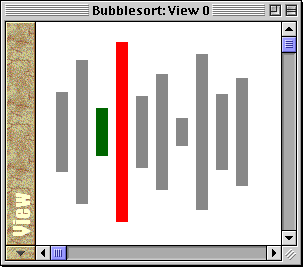
In our example concerning bubblesort, we aim at creating the classical sticks visualization for sorting algorithms: the numbers to be sorted are depicted as an ordered set of sticks with heights proportional to their values. An example of this kind of visualization is shown in the following image.
Step 2. Identifying the meaningful data structures
-
Due
to Leonardo's approach to visualization, when designing a visualization it
should be clear which data structures in the source code contain the information
that we wish to visualize. Moreover, the scope of the meaningful data structures
should be identified: indeed, if an Alpha predicate uses a C variable, that
variable must be visible when the predicate is declared.
- the global variable n, containing the number of values to be sorted;
- the global variable v, that is the array containing the integer values to be sorted;
- the
variable i,
local to the function BubbleSort
and used for scanning array v.
In our example, the meaningful data structures are the following:
We will refer to variables n and v for declaring the rectangles associated to the values to be sorted. On the other side, variable i will be used for coloring the rectangles corresponding to items being swapped during the execution of the BubbleSort function.
Step 3. Creating a basic visualization
-
We
are now ready to implement a basic visualization. Namely, we declare a view
containing n
rectangles identified by the numbers in the range 0
to n-1.
The k-th rectangle has height proportional to the value v[k].
The following piece of code accomplishes this task. Paste this piece of code in Leonardo's text editor window as follows:
|
#include <stdio.h>
int n; long v[100];
/** #define HSpace 8 #define Width 12 #define Middle 150 #define Dy 4
View(Out 0); Rectangle(Out N,Out X,Out Y,Out L,Out H,0)
**/
void BubbleSort(long v[],int n){
|
for (i=1;i<n;i++)
v[i-1]=v[i]; v[i]=temp; another=1; } } while (another); } void main(){
printf("How many numbers ? "); scanf("%d",&n); for (i=0;i<n;i++) {
scanf("%ld",&v[i]); } BubbleSort(v,n); for (i=0;i<n;i++)
} |
-
First
of all, observe that the visualization predicates must be enclosed between
the symbols /**
and **/,
that denote special C comments containing information related to the visualization.
Hence, it should be noticed that in Leonardo the symbol /**
cannot be used for opening a generic C comment.
- HSpace is the horizontal space inserted between consecutive rectangles;
- Width is the width of each rectangle;
- Middle is used to center all the rectangles along the y-axis;
- Dy is used for scaling up the height of rectangles.
- View(Out 0) implies the opening of a window having identification number equal to 0.
- Rectangle
declares the existence of a certain number of rectangles. Its first five
formal parameters (N,
X,
Y,
L,
and H)
represent the identification number, the x-coordinate and the y-coordinate
of the left-top corner, and the length and height of the rectangle, respectively.
The last formal parameter is the identification number of the window that
must contain the defined rectangles.
For what concerns the implementation of Rectangle, observe that the enumeration statement introduced by the keyword For is used for enumerating, one by one, all the numbers in the range [0..n-1]. In particular, this is done by repeatedly calling a predefined predicate named InRange.
Then, after the identification number N of a rectangle has been obtained, its geometrical features are assigned. Namely, its length L is a predefined constant, and its height H is proportional to the value in v corresponding to the rectangle itself. The x-coordinate X of the left-top corner is proportional to the identification number of the rectangle, since rectangle N must be assigned with the N-th position. At last, the y-coordinate Y of the left-top corner is assigned as follows: half of the height of the rectangle is subtracted from the position of an imaginary horizontal axis along which all the rectangles must be aligned (the subtraction is due to the fact the the y-axis grows from top to bottom).
The choice of enclosing visualization predicates in special comments guarantees the reusability of your C source code, that can still be compiled in programming environments other than Leonardo, even if it has been annotated with visualization declarations.
For what concerns the visualization, note that four constants useful for defining the geometric layout of rectangles are defined:
All constants indicate a number of pixels. Their meaning is illustrated in the next figure:

Two standard enumeration predicates have been used for realizing the visualization: View and Rectangle.
At this point, if you run the program, the execution environment should appear as follows:
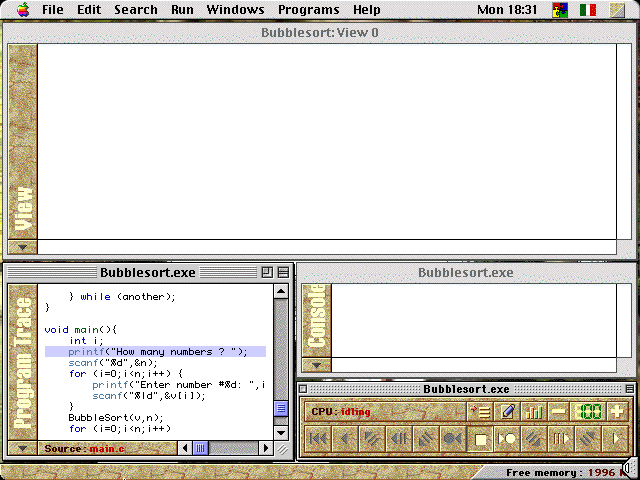
Note that a view is automatically opened as a consequence of the declaration View(Out 0). The name of the view contains the name of the project, i.e. BubbleSort, followed by the keyword View and by the identification number, i.e. 0.
At the very beginning of the execution, the view contains no rectangle since both the value of variable n and the values in array v are equal to 0.
Now, you can insert the input as requested by the program. We suggest to start with 6 numbers (i.e. n=6) chosen as follows: 50, 30, 60, 20, 40, 10. Note that, each time a new value is assigned to array v, the corresponding rectangle automatically appears in the view.
Finally, observe that during the execution of the BubbleSort function, all the swaps between items in v are automatically detected by Leonardo's visualization system. Therefore, you will see the rectangles whose positions are being exchanged that grow/shrink while they are being swapped.
Step 4. Refining the visualization: adding colors to rectangles
-
In
order to produce a more communicative visualization, we can color the rectangles
so as to highlight the pair of rectangles that is considered for possible
swapping at each step of the execution of the BubbleSort
function.
We can accomplish this task using the predicate RectangleColor.
In particular, in the global scope we declare that all rectangles are grey using the following declaration:
|
/** Set 1: RectangleColor(N,Out Grey,0); **/ |
This means that any rectangle N contained in the view 0 has a grey color. Note that Grey is a predefined constant: you can find a list of all such constants in Appendix B.
The directive Set is used for grouping a set of predicates into a set and for assigning them with a numeric label. In our example, the label 1 is associated to the single declaration RectangleColor(N, Out Grey, 0). In this way, in the following we will be able to refer to this declaration using its label for making it inactive and possibly for substituting it with more appropriate visualization rules.
Indeed, at the very beginning of the BubbleSort function, we can write the following:
|
/**
RectangleColor(N,Out C,0)
**/ |
The directive Negate 1 means that all visualization declarations contained in set 1 are no more valid. In our example, only the declaration RectangleColor(N, Out Grey, 0) belongs to set 1; hence, the assertion that all rectangles in view 0 are grey is no longer valid.
We substitute it with another declaration, i.e. RectangleColor(N, Out C, 0) Assign C= (N==i) ? Red : (N==i-1) ? Green : Grey, that means that the rectangle with identification number equal to i is Red, the rectangle with identification number equal to i-1 is Green, and all the remaining rectangles are Grey.
The complete code obtained so far is shown below.
|
#include <stdio.h> int n; long v[100];
/** #define HSpace 8 #define Width 12 #define Middle 150 #define Dy 4
View(Out 0); Rectangle(Out N,Out X,Out Y,Out L,Out H,0)
Set 1: RectangleColor(N,Out Grey,0); **/
void BubbleSort(long v[],int n){
/** Negate 1; RectangleColor(N,Out C,0)
**/ |
for (i=1;i<n;i++)
v[i-1]=v[i]; v[i]=temp; another=1; } } while (another); }
void main(){
printf("How many numbers ? "); scanf("%d",&n); for (i=0;i<n;i++) {
scanf("%ld",&v[i]); } BubbleSort(v,n); for (i=0;i<n;i++)
} |
-
Note
that at the end of the execution of the BubbleSort
function the assertions Negate
1 and RectangleColor(N,
Out C, 0) Assign
C= (N==i) ? Red
: (N==i-1) ? Green
: Grey are
automatically 'undoed' because the scope containing them is over. As a cosequence,
the visualization rules contained in Set
1 become active again and all rectangles are colored Grey
as before executing the function BubbleSort.
In general, the visualization predicates have the same visibility rules as C variables: each predicate is active only within the scope where it has been declared.
Step 5. Refining the visualization: skipping visualization events
-
If
you run the program, you can immediately observe that in the animation realized
so far there are some redundant visualization frames.
Indeed, the swapping of two items in the BubbleSort function is performed by means of three consecutive assignment statements. First, the value of item v[i-1] is stored in the auxiliary variable temp; then, item v[i-1] is assigned with the value of item v[i]; finally, item v[i] is assigned with the value of the auxiliary variable temp.
The second and the third assignment statements are interesting from a visualization point of view, since they change the content of array v that is referred to by predicate Rectangle.
Their execution produces the following visual effect: first, the green rectangle assumes the same height as the red rectangle, then the height of the red rectangle increases and becomes equal to the previous height of the green rectangle.
However, this effect is not desired, as we would like to consider the swap operation as an atomic step. We can use the animation control predicate VisualUpdateOn to do this. In particular, you can paste the Alpha declarations /** Not VisualUpdateOn; **/ and /** VisualUpdateOn; **/ in the C source code as follows:
|
#include <stdio.h> int n; long v[100];
/** #define HSpace 8 #define Width 12 #define Middle 150 #define Dy 4
View(Out 0); Rectangle(Out N,Out X,Out Y,Out L,Out H,0)
Set 1: RectangleColor(N,Out Grey,0); **/
void BubbleSort(long v[],int n){
/** Negate 1; RectangleColor(N,Out C,0)
**/ |
for (i=1;i<n;i++)
/** Not VisualUpdateOn; **/ v[i-1]=v[i]; v[i]=temp; /** VisualUpdateOn; **/ another=1; } } while (another); }
void main(){
printf("How many numbers ? "); scanf("%d",&n); for (i=0;i<n;i++) {
scanf("%ld",&v[i]); } BubbleSort(v,n); for (i=0;i<n;i++)
} |
-
In
this way, you prevent the screen from being updated during the swap operation
and you can elide all the redundant visualization frames.
Step 6. Refining the visualization: designing a more robust geometric layout
-
The
geometric layout of rectangles that has been designed so far presents some
problems when values in v
are too large. For instance, try to insert a number greater than 200;
you will see that the corresponding rectangle does not fit into the window.
Therefore, a more robust geometric layout must be designed.
First of all, remember that rectangles are currently centered along a horizontal axis whose vertical position is fixed and equal to the constant Middle. The solution to the layout problem shown so far consists in not keeping this position fixed, but in making it change according to the maximum value in array v. In this way, the visualization of all rectangles will always fill into both the left and the top side of the window.
With this aim, it is useful to define an auxiliary (non-standard) predicate that can be used to make the implementation of predicate Rectangle more readable. Note that auxiliary predicates play for Alpha programs the same role that macros and subroutines have for C programs.
We call the auxiliary predicate Max and we define it as follows:
|
/**
**/ |
Max(Out M) is an auxiliary predicate for computing the maximum value in the array v. This value is returned in the output parameter M. Observe that Max has been implemented by inserting a C block into an Alpha predicate body (see Chapter 9 for details about the Alpha language).
The previous declaration can be inserted in the global scope, just after the declarations of C variables n and v. Indeed, only these two variables are referred to by predicate Max.
At this point, we can modify the implementation of predicate Rectangle as follows:
|
Rectangle(Out N,Out X,Out Y,Out L,Out H,0)
|
Note that a local variable, i.e. M, is introduced for holding the maximum value in v and the For statement is used in order to invoke predicate Max. The value of M is then used for the y-coordinate assignment: M*Dy/2 plays the role of Middle, that is it indicates the vertical position of the horizontal axis along which rectangles have to be aligned.
The complete visualization code is shown below.
|
#include <stdio.h> int n; long v[100];
/** #define HSpace 8 #define Width 12 #define Dy 4
Max(Out M) Assign M In {
};
View(Out 0); Rectangle(Out N,Out X,Out Y,Out L,Out H,0)
Set 1: RectangleColor(N,Out Grey,0); **/
void BubbleSort(long v[],int n){
/** Negate 1; |
**/ do {
for (i=1;i<n;i++)
/** Not VisualUpdateOn; **/ v[i-1]=v[i]; v[i]=temp; /** VisualUpdateOn; **/ another=1; } } while (another); }
void main(){
printf("How many numbers ? "); scanf("%d",&n); for (i=0;i<n;i++) {
scanf("%ld",&v[i]); } BubbleSort(v,n); for (i=0;i<n;i++)
} |